
Piste: • theforeman
Pages_it:provisioning:theforeman
Ceci est une ancienne révision du document !
Table des matières
The Foreman installation with Katello support
Katello is a content manager which allows to create, organize and manage Yum and Puppet repositories. Sync remote repositories or upload content directly to build your own custom content.
Katello is now fully integrated to The Foreman, the provisioning and configuration solution.
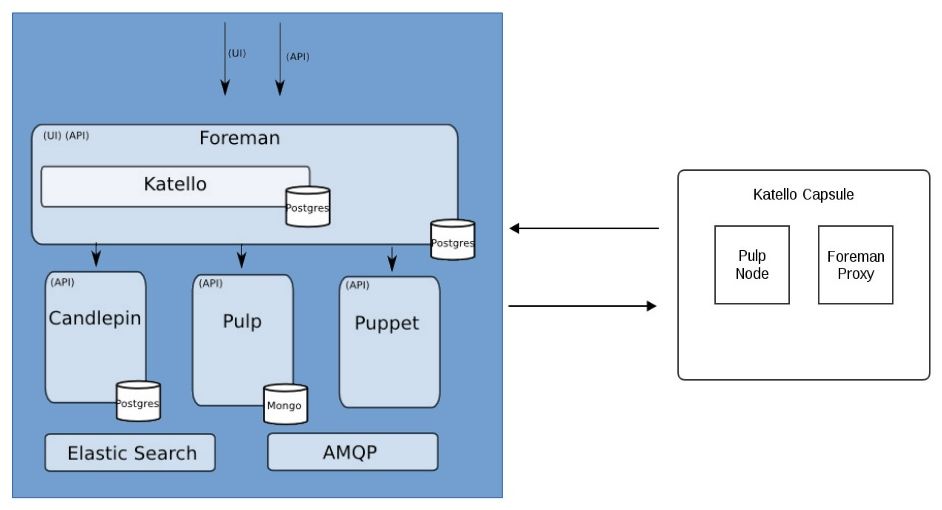 Katello permits to keep in sync many external sources :
- Yum repositories,
- Puppet forges,
- Docker registries,
- Red Hat CDN (with a subscription manifest)
More readings :
Prerequisites
Software
Foreman/Katello install on amd64 arch excusively, and can run on RHEL/CentOS 6 or 7.
Hardware
12GB are highly recommended.
| minimum | recommended | |
|---|---|---|
| RAM | 8GB | 12GB |
| CPU | 2 cores | 4 cores |
Storage
| mountpoint | size | comments |
|---|
Red Hat strongly recommends to use LVM for partitioning, and XFS as filesystem for storage and database.
| / | 10GB | base system |
| /var/lib/pulp | 500GB+ | storage for mirrored repositories |
| /var/lib/mongodb | 20GB-100GB | storage database |
| /var/lib/pgsql | 2GB-50GB | storage database |
Installation
storage & filesystem
- Create and format XFS filesystem for Foreman data
lvcreate -n pulp -L 500G vg_foreman
lvcreate -n mongodb -L 50G vg_foreman
lvcreate -n pgsql -L 50G vg_foreman

mkfs.xfs /dev/vg_foreman/pulp
mkfs.xfs /dev/vg_foreman/mongo
mkfs.xfs /dev/vg_foreman/pgsql
- Create mountpoints
mkdir /var/lib/mongodb /var/lib/pulp /var/lib/pgsql

cat <<EOF >> /etc/fstab
/dev/vg_foreman/pulp   /var/lib/pulp     xfs  defaults 0 0
/dev/vg_foreman/mongo  /var/lib/mongodb  xfs  defaults 0 0
/dev/vg_foreman/pgsql  /var/lib/pgsql    xfs  defaults 0 0
EOF

mount -a
Software dependencies
- Add EPEL repository
yum install -y epel-release
yum update -y
- Add Katello/Puppet/Foreman repositories
# Katello
yum -y localinstall http://fedorapeople.org/groups/katello/releases/yum/3.4/katello/el7/x86_64/katello-repos-latest.rpm
# The Foreman
yum -y localinstall http://yum.theforeman.org/releases/1.15/el7/x86_64/foreman-release.rpm
# Puppet 4
yum -y localinstall https://yum.puppetlabs.com/puppetlabs-release-pc1-el-7.noarch.rpm
Software installaton
- Install Foreman with Katello software and dependencies
yum -y install foreman-release-scl
yum update -y
yum install -y katello
- Deploy Foreman with Katello
foreman-installer --scenario katello
- Configure firewall
firewall-cmd --permanent --zone=public --add-service=http
firewall-cmd --permanent --zone=public --add-service=https
firewall-cmd --permanent --zone=public --add-service=tftp
firewall-cmd --permanent --zone=public --add-service=puppetmaster
firewall-cmd --permanent --zone=public --add-port=8080/tcp
firewall-cmd --reload
Configuration
Mirror a Yum repository
In the below example, we'll mirror CentOS 7 base repository.
Organization
On a fresh Foreman install, the very first step is to create an organization
<columns - →
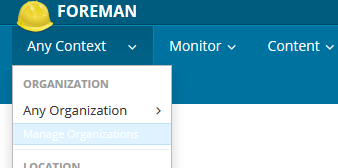
On the Menu bar, click on “Any Context”, then on “Manage Organizations” menu item
<newcolumn>
 </columns>
<columns - →
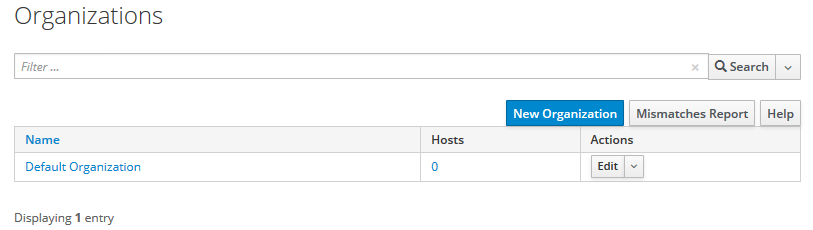
Click on “New Organization” Button
<newcolumn>
 </columns>
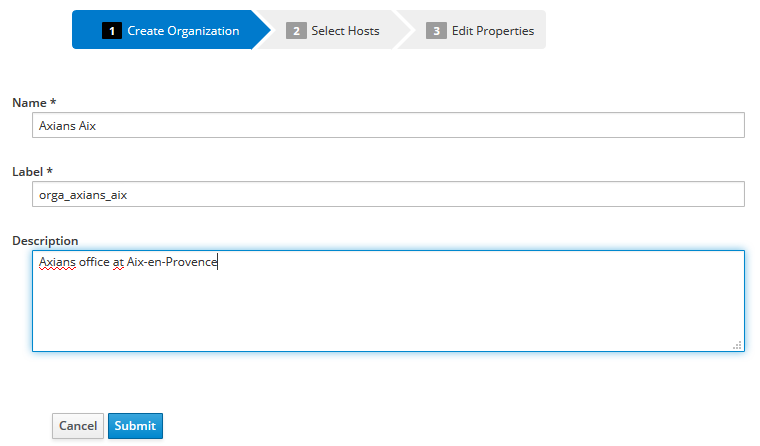
<columns - → Fill the fields accordingly to your need :
- Name is the display name of your organization,
- Label is the internal name used by Foreman and Katello
- description is a free form where you can describe the organization
<newcolumn>
 </columns>
Sync plan
GPG key
Product
Dowbload policy
- On demand : only repo's metadata are downloaded from the remote repository, then packages are fetched and stored on local FS only when clients request them,
- Background : repo's metadata are downloaded from the remote repository, then packages are downloaded as a background task after the initial sync,
- Immediate : both repo's metadata and packages are downloaded.
Environment
Content View
Activation keys
Configure client host
- Install necessary packages
yum install -y subscription-manager
yum localinstall -y http://192.168.122.178/pub/katello-ca-consumer-katello.internal.lan-1.0-1.noarch.rpm
- register the server to Katello server
subscription-manager register --org="orga_axians_aix" --activationkey="Axians Aix production key"
The system has been registered with ID: c21106ec-9991-4246-b101-966b2dda99a8

No products installed.
List available subscriptions :
  subscription-manager list --available --all
  +-------------------------------------------+
      Available Subscriptions
  +-------------------------------------------+
  Subscription Name:   EPEL7 for CentOS/RHEL
  Provides:
  SKU:                 884388902125
  Contract:
  Pool ID:             4028fa325e577a77015e5b0d989a0025
  Provides Management: No
  Available:           Unlimited
  Suggested:           1
  Service Level:
  Service Type:
  Subscription Type:   Standard
  Ends:                08/31/2047
  System Type:         Physical
Attach to a subscription :
  subscription-manager attach --pool=4028fa325e577a77015e5b0d989a0025
  Successfully attached a subscription for: EPEL7 for CentOS/RHEL